
-
FunnlQ
- July 16, 2026
You don’t build an outbound engine by buying software. You build it by creating infrastructure that software can rely on.
A SaaS founder called us last year right after what looked, on paper, like a clean outbound launch. The team had done everything they thought they were supposed to do: bought a premium sales engagement platform, connected a handful of inboxes, imported a few thousand prospects, wrote personalized sequences, and hired their first SDR.
Week one looked great. Emails went out. Open rates looked healthy. The dashboard was full of activity, which felt like progress.
By week three, everything slowed down. Reply rates dropped. Bounce rates crept up. A couple of mailboxes stopped producing anything at all.
The team’s first instinct was to blame the SDR. Then the email copy. Then the prospect list. Eventually, someone floated the idea that outbound just didn’t work for their market.
None of that was the actual problem. The infrastructure underneath the campaign had never been built correctly in the first place — and no amount of better copy, a better SDR, or a better list was going to fix a foundation that wasn’t there.
This is the piece that belongs right after the one on inbox deliverability in this series, because deliverability and infrastructure are two different layers of the same problem. Deliverability is about protecting the reputation of a system you’ve already built. Infrastructure is about whether that system was ever built correctly to begin with.
Why It Matters
Most founders think “infrastructure” means servers, code, or cloud hosting — something for the engineering team, not sales. Outbound infrastructure is a different thing entirely. It’s the technical foundation underneath every outbound activity your company runs: the domains, the authentication, the mailboxes, the DNS records, the data pipeline, and the ongoing maintenance that keeps all of it healthy.
Think about building a modern office. Before anyone shows up for work, someone has already handled electricity, internet, and security. Only after that foundation exists does furniture, or anything else visible, matter. Outbound works exactly the same way. Before an SDR sends the first email, the technical environment underneath them either supports success or quietly undermines it.
The reason this matters more than founders expect: infrastructure problems don’t look like infrastructure problems when they show up. They look like a messaging problem, a targeting problem, or a “this SDR isn’t very good” problem — which is exactly why the founder in the story above spent three weeks blaming the wrong three things before anyone checked the DNS records.
The Framework: The Six Pillars of Outbound Infrastructure
Everything in modern outbound rests on six connected pillars. Skip or rush any one of them, and the layers built on top become unstable, regardless of how good they look individually.
Pillar One: Domains. Your domain is your digital identity — it’s what tells mailbox providers who you are before they read a single word you’ve written. Your primary company domain should be protected, not spent down on cold outreach. Most well-run outbound programs use dedicated sending domains, kept separate from the domain your invoices, product notifications, and support replies run on.
Pillar Two: Authentication. SPF, DKIM, and DMARC are the three standards that tell mailbox providers your emails genuinely come from your organization, not someone spoofing it. One detail that trips up more technical teams than you’d expect: SPF records have a hard limit of 10 DNS lookups per check, defined in the protocol itself (RFC 7208). Stack too many third-party senders — your CRM, your sales engagement tool, your marketing platform — into one SPF record, and it silently fails once you cross that limit, with no obvious error message pointing you to why.
Pillar Three: Mailboxes. These are the individual sending identities your team actually uses. Good infrastructure means clearly named mailboxes, sensible sending limits, consistent monitoring, and one owner per mailbox — never multiple SDRs sharing a single inbox, which makes both troubleshooting and accountability nearly impossible.
Pillar Four: DNS Configuration. Every domain carries DNS records that tell the internet how to route and validate your email. Misconfigured DNS is one of the most common reasons outbound campaigns underperform — and it’s also one of the easiest problems to prevent, because it only has to be done correctly once.
Pillar Five: Data Infrastructure. Even flawless email infrastructure can’t rescue bad data. Every outbound system needs a repeatable process for collecting contacts, validating emails, removing duplicates, catching job changes, and managing suppression lists. Clean data protects both your sender reputation and your team’s time.
Pillar Six: Operational Discipline. Infrastructure isn’t a one-time setup. It needs ongoing maintenance — reviewing bounce rates, checking authentication status, monitoring sender reputation, updating prospect data, auditing live campaigns. Healthy systems get maintained continuously, not just when something visibly breaks.
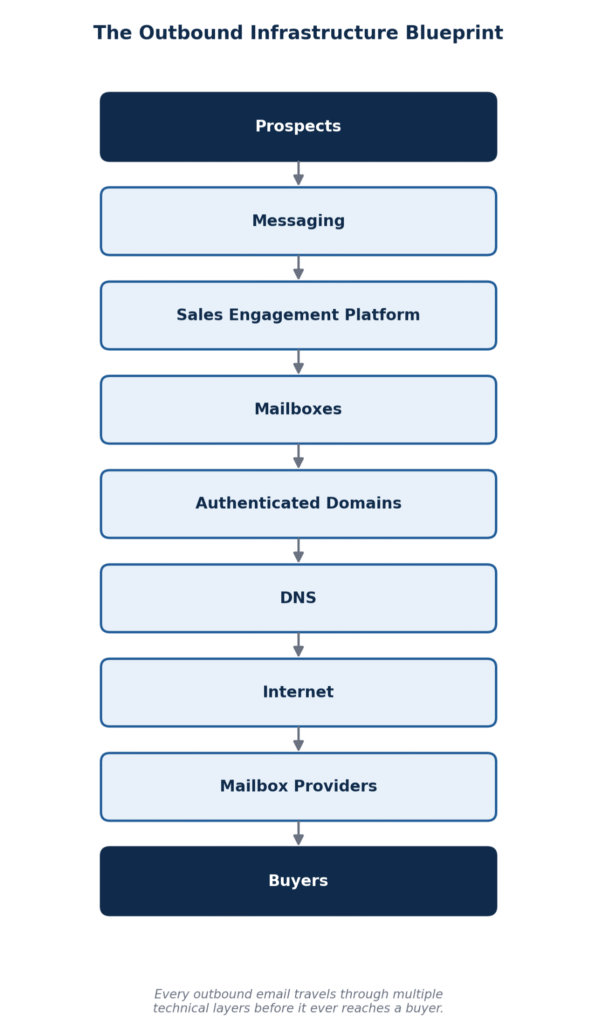
Infrastructure is like building a house. Nobody hires an architect and starts by picking curtains. You pour the foundation, run the plumbing and wiring, put up the roof — and only then does furniture become a sensible thing to think about. Most outbound teams do this backwards. They start with email copy, which actually sits near the top of the construction process, and wonder why everything above an unstable foundation keeps shifting.
What This Looks Like When It’s Built Right (and When It’s Not)
Two software companies, same expansion, opposite sequencing. Both were preparing to enter the US market around the same time. Company A moved fast: bought an outbound platform, spun up multiple mailboxes, and launched campaigns within three days. Everything looked efficient — for a while. Three months in, they were fighting inconsistent deliverability and burning weeks troubleshooting technical issues that traced straight back to skipped setup steps in week one.
Company B spent the first two weeks doing something that felt, at the time, like a delay: purchasing dedicated sending domains, configuring authentication properly, documenting mailbox ownership, building a naming convention, validating prospect data, and testing every configuration before a single campaign went live. Their launch was genuinely slower. But once it started, the team spent its time improving messaging and talking to customers — not reacting to technical fires. The two-week delay saved months of downstream troubleshooting.
The shared-mailbox problem. A mid-market SaaS team had three SDRs sending from two mailboxes, split by whoever was free. Within six weeks, neither mailbox’s performance data meant anything — nobody could tell which rep’s messaging was working, bounce troubleshooting turned into a guessing game, and one mailbox’s reputation dragged down replies for reps who were otherwise doing solid work. Moving to one mailbox per rep, each named and owned individually, resolved the confusion inside of a month — not because the messaging changed, but because the data finally reflected reality.
The SPF lookup ceiling nobody noticed. A growth-stage company had layered their CRM, their sales engagement platform, and a marketing automation tool into a single SPF record over about a year of adding new tools. Nobody was counting DNS lookups. Once they crossed the 10-lookup ceiling, SPF began failing silently for a portion of sends — not catastrophically, just enough to quietly suppress deliverability for weeks before anyone traced it back to a technical limit almost nobody on the team knew existed.
The Mistakes That Quietly Sabotage Outbound
Using the primary business domain for every outbound activity. This is the single most common mistake, and the most expensive one to unwind — a damaged cold-outreach domain can drag down deliverability for the transactional and customer-facing email your company actually depends on.
Launching before authentication is fully in place. SPF, DKIM, and DMARC aren’t optional configuration — they’re the baseline mailbox providers use to decide whether to trust you at all, from the very first send.
Sharing one mailbox across multiple SDRs. It erases individual accountability, makes performance data meaningless, and turns troubleshooting into guesswork the moment something goes wrong.
Ignoring DNS changes after initial setup. DNS isn’t “set once and forget forever.” Adding a new tool, switching a provider, or letting a record lapse can quietly break authentication months after everything looked fine.
Using outdated prospect databases. Data decays faster than most founders expect — job changes, email changes, and company moves erode list quality continuously, not just at the moment you bought it.
Expanding infrastructure without documentation. Five mailboxes are easy to keep in your head. Fifty aren’t. Teams that scale without a running record of every domain, mailbox, and DNS change end up rebuilding institutional knowledge from scratch the first time something breaks.
The Infrastructure Audit Checklist
Run through this before a single outbound campaign launches.
Domains
- Dedicated outbound sending domains purchased, separate from the primary business domain
- A documented naming convention for every domain
Authentication
- SPF configured and under the 10-lookup limit
- DKIM configured, minimum 1024-bit key (2048-bit recommended)
- DMARC configured and aligned with the sending domain
Mailboxes
- Individual ownership assigned — one person per mailbox
- Password management secured
- Sending limits documented and enforced
CRM
- Connected correctly to every sending platform
- Lead stages clearly defined
- Duplicate detection enabled
Prospect Data
- Email validation completed before import
- Duplicate contacts removed
- Segmentation complete before the first send
Operations
- Reporting dashboard configured and tested
- A weekly review process established before launch, not after problems appear
KPIs to Watch
- SPF lookup count — stay comfortably under the 10-lookup ceiling; check this every time a new sending tool is added
- Bounce rate per domain — a rising trend here is an infrastructure signal, not a list-quality afterthought
- Mailbox-level sending volume — track against a safe per-mailbox ceiling (roughly 30-40/day) rather than a blended team-wide average, which hides problem mailboxes
- Authentication status per domain — reviewed monthly, not just at setup
- Time since last DNS audit — if it’s been more than a quarter, that’s the first place to look when performance dips unexpectedly
Founder Insight
The most common mistake I see founders make is assuming infrastructure delays growth. It’s the opposite. Every hour spent getting the foundation right before launch saves days of troubleshooting later — and troubleshooting under pressure, with a board update due and a founder asking why pipeline dried up, is a much worse place to be doing this work than in a calm setup phase before anyone’s watching the numbers.
Consultant Tip
Keep a single, living document that records every sending domain, every mailbox, every DNS change, every authentication record, who owns each one, what it’s for, and when it was created. It feels like overhead at five mailboxes. It becomes indispensable the moment you’re running fifty — and by then, rebuilding that knowledge from scratch costs far more than maintaining it would have.
Summary
Successful outbound doesn’t start with technology. It starts with architecture. Companies that invest the time to build reliable infrastructure spend less time firefighting technical issues and far more time actually talking to buyers — which is the entire point of running outbound in the first place.
Infrastructure is invisible to your prospects. They’ll never see the SPF record, the DNS configuration, or the mailbox naming convention. But it’s one of the biggest reasons predictable outbound succeeds or quietly fails. Build the foundation once, correctly, and it pays off for years. Skip it, and you’ll spend those same years paying for it in smaller, harder-to-diagnose increments.
Frequently Asked Questions
How many sending domains should a company have for outbound? There’s no universal number — it depends on outreach volume, team size, and risk tolerance. The underlying principle matters more than the count: build infrastructure that can scale without ever touching the domain your core business communications depend on.
Should every SDR have their own mailbox? In almost every case, yes. Individual ownership improves accountability, simplifies troubleshooting, and produces performance data that actually means something.
How often should outbound infrastructure be audited? A monthly review is a reasonable baseline, with an additional check any time you expand your outbound program, switch providers, or notice an unexplained performance shift.
What is the SPF 10-lookup limit, and why does it matter? SPF records can perform a maximum of 10 DNS lookups per check, per the protocol specification. Layering too many third-party senders into one SPF record silently breaks authentication once you cross that limit — often without an obvious error pointing to the cause.
Is outbound infrastructure a one-time project? No. It evolves alongside your business. As your team and sending volume grow, the infrastructure underneath it needs to grow — and get re-audited — right along with it.
Ready to Build Infrastructure That Actually Holds Up?
At FunnlQ, every outbound program we run starts with infrastructure, not campaign copy — because no amount of great messaging survives a foundation that wasn’t built correctly.
We help SaaS founders and revenue leaders:
- Audit domains, DNS, and authentication before a single campaign launches
- Set up mailbox architecture that scales cleanly from 5 inboxes to 50
- Build the data validation and hygiene processes that protect sender reputation long-term
- Document infrastructure the right way, so institutional knowledge doesn’t disappear when the team grows
- Diagnose whether a performance problem is actually a foundation problem before touching the messaging
If your outbound results have been inconsistent and you’ve already rewritten the campaign, the fix might be several layers underneath the copy. Connect with FunnlQ and get your infrastructure audited before the next launch.